
Struggling to concentrate while studying, working, or completing everyday tasks? The problem may not be a lack of discipline. Your surroundings can influence how often your attention gets interrupted, how comfortable you feel, and how much mental effort you spend filtering distractions.
A noisy room, cluttered desk, constant phone notifications, or uncomfortable chair can make focused work harder than it needs to be. On the other hand, a thoughtfully arranged environment can reduce interruptions and make it easier to begin and sustain a task.
Creating a better focus environment does not require an expensive home office or a complete room makeover. Small changes to your physical surroundings, digital habits, and daily routines can make your workspace more supportive of concentration.
What Does a Focus-Friendly Environment Look Like?
A focus-friendly environment is a space designed to support a particular task while minimizing unnecessary interruptions. It considers both the physical area around you and the digital environment you use to work or study.
A supportive setup typically includes:
- A clear, organized work surface.
- Comfortable and appropriate lighting.
- Manageable noise levels.
- A comfortable desk and chair.
- Fewer unnecessary notifications and visual distractions.
- Easy access to the materials needed for the current task.
- Clear boundaries between focused work and leisure.
The goal is not to create a perfectly silent or aesthetically pleasing room. It is to reduce the number of things competing for your attention.
Why Does Your Environment Affect Concentration?
Your attention is limited. While you work, your brain also receives information from sounds, movement, objects, screens, and other people. Some of this information is relevant, but the rest must be ignored or filtered.
When your environment contains frequent interruptions, you may have to repeatedly redirect your attention toward the task. This can make work feel more tiring and may increase the time needed to complete it.
Environmental factors can affect focus in several ways:
- Noise: Unexpected sounds and nearby conversations can interrupt attention.
- Clutter: A visually disorganized space may make it harder to keep your attention on one task.
- Poor lighting: Glare or inadequate light can contribute to eye discomfort and fatigue.
- Physical discomfort: An unsuitable chair, desk, or screen position can become a recurring distraction.
- Digital interruptions: Notifications and open entertainment apps can pull attention away from important work.
- Temperature and air quality: An uncomfortable room can make it more difficult to remain attentive.
Research on office environments and cognitive performance suggests that factors such as noise, lighting, temperature, and air quality deserve consideration when designing a workspace. However, there is no single setup that works equally well for everyone.
1. Choose a Dedicated Place for Focused Work
One of the simplest ways to improve your environment is to designate a consistent place for a specific type of work.
You do not need a separate office. A corner of your bedroom, a section of a dining table, or a quiet desk can work if it is practical and available.
When choosing your spot, consider:
- Foot traffic: Avoid areas where people frequently walk past.
- Noise: Choose a location away from televisions, busy kitchens, or loud equipment when possible.
- Visibility: Position your desk so that movement around you is less distracting.
- Accessibility: Keep books, stationery, chargers, and other essential materials within reach.
- Consistency: Use the same area for focused work whenever practical.
If you live in a shared home, your ideal location may not be the quietest room. Instead, choose the best available space and improve it with other strategies, such as headphones, a visual “do not disturb” signal, or a mutually agreed-upon work period.
2. Reduce Visual Clutter Without Chasing Minimalism
A crowded workspace can compete for your attention, especially when objects are unrelated to the task in front of you. You do not need a completely empty desk, but keeping unnecessary items out of your immediate field of view may make it easier to focus.
Try the following:
Use the one-task surface rule
Keep only the materials required for your current activity on the main work surface. If you are writing an assignment, you may need a notebook, laptop, and reference material—but not unrelated paperwork, gaming accessories, or several unfinished projects.
Store distractions out of sight
Place unused objects in a drawer, shelf, box, or another part of the room. If you work digitally, close unnecessary windows and browser tabs.
Keep the essentials accessible
Decluttering should not create extra friction. Store frequently used items where you can reach them easily.
Reset your desk after each session
Spend two or three minutes returning materials to their places. A quick reset can make the next work session easier to begin.
Remember: A useful workspace is not necessarily a minimalist one. The best arrangement is the one that helps you find what you need without constantly drawing your attention away from the task.
3. Improve Lighting for Comfortable, Sustained Work
Lighting affects visibility, comfort, and the overall usability of your workspace. Poor lighting can cause glare, shadows, or eye strain, particularly when you spend long periods reading or using a screen.
Make the most of natural light
If possible, work in a space with natural daylight. Place your desk so that light illuminates your work without shining directly into your eyes or reflecting strongly off your monitor.
Side lighting is often more practical than placing a window directly behind a screen.
Use task lighting when necessary
A desk lamp can help when the room is dim or when you need additional light for reading and writing. Aim the light toward the work surface rather than directly at your eyes.
Reduce screen glare
Adjust your monitor angle, window coverings, or desk position to reduce reflections. Keep the screen bright enough to read comfortably without making it much brighter than the surrounding room.
Adjust lighting for the time of day
Brighter daytime lighting may help you remain alert. In the evening, softer lighting may be more comfortable and less disruptive to a relaxing bedtime routine.
There is no universal “best” brightness or color temperature for every person or task. Prioritize comfortable visibility, low glare, and lighting that suits your schedule.
4. Manage Noise and Background Conversations
Noise is one of the most common environmental barriers to concentration. Sudden sounds may interrupt your work, while speech can be particularly distracting when you are trying to read, write, or solve a complex problem.
You cannot always control the noise around you, but you can reduce its impact.
Identify the type of noise
Is your main problem traffic, household activity, music, nearby conversations, or unpredictable interruptions? Understanding the source helps you choose the right solution.
Try a quieter location
Move away from high-traffic areas or noisy equipment when possible. Even a small change in position may reduce interruptions.
Use headphones strategically
Noise-isolating or noise-cancelling headphones may help reduce certain background sounds. They are not a guarantee of silence, and you should remain aware of important environmental sounds when necessary.
Experiment with background sound
Some people prefer silence, while others work better with steady, low-level background sound. Instrumental music, ambient sound, or consistent noise may be useful for certain tasks.
If music contains lyrics that compete with reading or writing, try silence or non-lyrical audio instead.
Establish household boundaries
If you work from home, tell others when you need uninterrupted time. A closed door, a sign, or a shared schedule can help communicate when interruptions should be avoided.
The best sound environment is the one that minimizes unwanted attention shifts without creating another distraction.
5. Set Up Your Desk and Screen for Physical Comfort
Physical discomfort can repeatedly pull your attention away from your work. An uncomfortable chair, poorly positioned monitor, or awkward keyboard setup may make long sessions more difficult.
A focus-friendly workspace should support a comfortable, sustainable posture.
Adjust your chair
Choose a chair that supports your body and allows your feet to rest comfortably on the floor or a suitable footrest. Avoid remaining in one rigid position for extended periods.
Position your monitor appropriately
Place your screen at a height and distance that allow you to view it comfortably without repeatedly bending your neck or leaning forward.
Keep your keyboard and mouse accessible
Arrange them so that your shoulders can remain relaxed and your wrists are not forced into an awkward position.
Take movement breaks
Even a well-designed workstation does not eliminate the need to move. Stand up, stretch, walk briefly, or change position during longer sessions.
Ergonomics is not about finding one perfect posture. It is about reducing strain, supporting comfort, and allowing regular movement.
6. Create a Digital Environment That Protects Your Attention
A clean desk will not automatically improve concentration if your phone, notifications, and browser tabs are constantly demanding attention.
Your digital environment deserves the same consideration as your physical workspace.
Silence non-essential notifications
Turn off alerts from social media, shopping apps, games, and other services that are not relevant to your current task.
Use a focus mode or Do Not Disturb setting when appropriate. Allow important calls or messages through if you need to remain reachable.
Put your phone out of immediate reach
Place your phone in a bag, drawer, or another room during a focused session if you do not need it. Physical distance can reduce the temptation to check it.
Limit open tabs
Keep only the tabs required for your current activity. Save unrelated articles or ideas for later rather than leaving them open in your main workspace.
Use website or app limits when useful
If certain websites repeatedly interrupt your work, consider using built-in app limits or website-blocking tools during planned focus periods.
Separate work and entertainment
If possible, use different browser profiles, devices, or workspaces for focused tasks and leisure activities. This can reduce the number of cues associated with distraction.
The objective is not to eliminate technology. It is to make technology serve your task instead of repeatedly interrupting it.
7. Make the Room Comfortable: Temperature and Air Quality
A room that is too hot, too cold, stuffy, or poorly ventilated may make sustained work uncomfortable.
There is no single temperature that guarantees better concentration. Individual preferences, clothing, activity level, humidity, and the type of work all matter.
To improve comfort:
- Adjust the room temperature to a level that feels comfortable for you.
- Improve ventilation when outdoor conditions allow.
- Avoid placing your desk directly in an uncomfortable draft.
- Keep the room free from strong, distracting odors.
- Take short breaks outside or in another room when the air feels stale.
Air quality and thermal comfort are often overlooked because they are less visible than clutter or notifications. Nevertheless, they can influence how comfortable you feel during a long work session.
8. Use Environmental Cues to Enter Focus Mode
Your surroundings can become cues that help you transition into a particular activity.
For example, using the same desk, opening the same notebook, or beginning with a short planning routine may help create a consistent start to your work.
Try building a simple focus ritual:
- Clear the work surface.
- Put your phone on silent and out of reach.
- Open only the materials needed for the task.
- Write down one specific goal.
- Set a realistic period for focused work.
- Begin with the smallest useful action.
Over time, repeating this sequence may make starting work feel more familiar. The ritual is not a magic switch for concentration, but it can reduce the number of decisions required before you begin.
9. Match Your Environment to the Task
Different activities may require different conditions.
These are starting points, not strict rules. Your own experience should guide adjustments.
10. Build a Focus-Friendly Space on a Limited Budget
Improving concentration does not require expensive furniture, smart lighting, or a dedicated office.
Start with changes that cost little or nothing:
- Move your desk away from the busiest part of the room.
- Clear unrelated items from your immediate workspace.
- Turn off non-essential notifications.
- Put your phone out of reach.
- Adjust your screen angle to reduce glare.
- Use natural light when available.
- Tell others when you need uninterrupted time.
- Keep a bottle of water and necessary materials nearby.
- Use a folded towel or cushion if it improves comfort temporarily.
- Take regular movement breaks.
If you have a small room or shared space, focus on controlling the area immediately around you. You do not need to optimize the entire home to make one corner more supportive of concentration.
11. Find Your Biggest Environmental Distraction
Not every change has the same value. Instead of changing everything at once, identify the factor that most often interrupts your attention.
Ask yourself:
- What usually breaks my concentration first?
- Do I lose focus because of noise, my phone, clutter, or discomfort?
- When do I do my best work?
- Which part of my workspace feels most inconvenient?
- What can I change in the next ten minutes?
Then make one targeted adjustment.
For example:
- If notifications are the problem, activate focus mode.
- If clutter is distracting, clear your main work surface.
- If noise is unavoidable, try a quieter location or appropriate headphones.
- If discomfort is persistent, adjust your chair or screen.
- If you keep postponing work, create a simple start ritual.
A targeted improvement is often more practical than attempting a complete workspace transformation.
12. Use a Simple Workspace Audit
You can evaluate your environment in less than five minutes. Rate each factor from 1 to 5, where 1 means “strongly interferes with focus” and 5 means “supports focus well.”
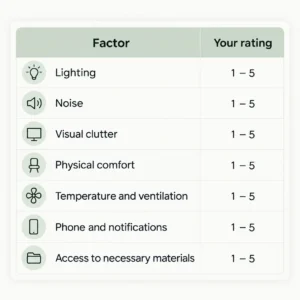
Look for the lowest score. That is a useful place to begin.
After making a change, use the same rating system again after several work sessions. Notice whether the adjustment improved your experience, had no effect, or created a new problem.
This approach avoids assuming that every popular productivity tip will work for you.
13. Maintain Your Environment Over Time
A workspace can become distracting again when clutter accumulates, notifications return, or household routines change.
A small maintenance routine can help:
Before a focus session
- Remove unnecessary items.
- Prepare the materials you need.
- Silence irrelevant notifications.
- Set a clear task goal.
During the session
- Keep unrelated tabs and devices out of the way.
- Notice when your attention drifts.
- Take breaks before discomfort becomes significant.
After the session
- Return materials to their places.
- Record unfinished tasks.
- Reset the desk for the next session.
- Review which environmental factor helped or hindered you.
The purpose of maintenance is to make a supportive environment easier to recreate, not to keep your workspace perfect at all times.
What If You Still Cannot Concentrate?
Improving your environment can remove unnecessary distractions, but it cannot solve every cause of concentration difficulties.
Sleep problems, stress, anxiety, depression, certain medications, hearing or vision difficulties, and other health conditions may affect attention. Harvard Health Publishing also notes that information overload, excessive alcohol use, and underlying medical conditions can contribute to concentration problems.
If difficulty concentrating is persistent, worsening, or interfering with daily life, consider speaking with a qualified healthcare professional. Seek advice particularly if changes in attention occur suddenly or alongside other concerning symptoms.
Environmental changes can be helpful, but they should complement—not replace—appropriate medical care when it is needed.
Frequently Asked Questions
What is the best environment for concentration?
The best environment is one that minimizes unwanted interruptions while providing comfortable lighting, manageable noise, suitable temperature, and an organized work surface. The ideal setup varies depending on the person, task, and available space.
How can I create a distraction-free workspace at home?
Choose a consistent work area, remove unrelated objects, silence unnecessary notifications, keep your phone out of reach, and communicate your focus periods to other household members. Even a small corner can work.
Does a clean room improve focus?
A clean and organized workspace may reduce visual distractions and make it easier to find the materials you need. However, a perfectly tidy room is not essential. Focus on the parts of the environment that interfere with your work.
Is silence necessary for better concentration?
No. Some people prefer silence, while others find steady background sound or instrumental music helpful. Unexpected noise and speech may be more distracting for certain tasks, so experiment with what works for you.
Does lighting affect concentration?
Lighting affects visibility and comfort. Natural light or suitable task lighting may make reading and screen work easier, while glare and inadequate illumination can contribute to discomfort. Adjust your setup based on the task and time of day.
How do I focus when I share a room?
Use a designated corner, headphones when appropriate, visual boundaries, and agreed-upon quiet periods. Keep your immediate work area organized, even if you cannot control the rest of the room.
How long should I work before taking a break?
There is no single ideal focus interval for everyone. Start with a manageable period, such as 25 to 30 minutes, and adjust according to the difficulty of the task, your energy, and your ability to sustain attention. Take breaks to move, rest your eyes, or reset your workspace.
Final Thoughts
Better concentration is not always about trying harder. Sometimes, it begins with changing the conditions in which you work.
A supportive focus environment combines a clear workspace, comfortable lighting, manageable noise, ergonomic adjustments, fewer digital interruptions, and consistent routines. You do not need to implement every change immediately.
Start by identifying the biggest distraction in your current environment. Make one practical adjustment, observe how it affects your work, and continue refining your setup.
When your surroundings support the task instead of competing with it, maintaining focus can become easier and more sustainable.
Sources and further reading
- Harvard Health Publishing. Tips to improve concentration. Discusses mindfulness, cognitive training, sleep, exercise, information overload, and factors that can affect attention.
- American Psychological Association. Work and well-being resources. Provides information about workplace well-being, stress, and healthy work environments.
- Occupational Safety and Health Administration. Computer workstations. Practical guidance on workstation arrangement, screen positioning, and ergonomic considerations.
- U.S. Environmental Protection Agency. Indoor Air Quality. Information about indoor environmental conditions and factors that can affect indoor air quality.
- National Institute for Occupational Safety and Health. Total Worker Health. Research and guidance concerning working conditions, health, safety, and worker well-being.